How To Manage Your Google Ad Grants Account?
Six habits of a well-run grant account.
Every night at midnight, part of your Google Ad Grant expires. Whatever your campaigns did not spend from the day’s budget is gone, and the next morning the count starts again. That alone makes Google Ad Grants management different from running a commercial Google Ads account. Add an auction in which grant ads only get the positions paid advertisers leave open, and a set of program rules Google checks every month, and you have an account that needs more than a good first setup.
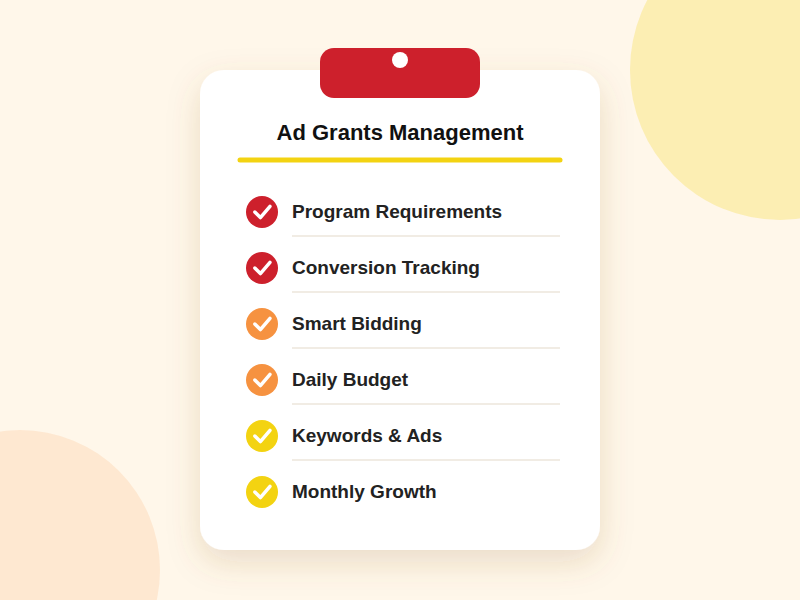
What it needs are habits. Below are the six we see in every well-managed Ad Grants account, and how to build them into your own routine.
What Does Google Ad Grants Management Involve?
It helps to think of the work as running on three clocks. The first one never stops. The account has to stay within the program rules every single day. The second ticks once a week, when keywords, ads and performance get a closer look. The third ticks once a month, when results are reviewed, the account grows and compliance gets a full check.
The six steps below are spread across these three clocks.
Step #1 Start With The Rules
Ad Grants is a gift with conditions attached. Google expects every account to follow the program requirements, and an account that keeps breaking them can be suspended. The list is short, but every point on it counts:
- Account Structure: at least two active ad groups in each campaign, each with relevant keywords and a responsive search ad.
- Keyword Quality: no single-word or overly generic keywords, and no active keywords with a Quality Score of 1 or 2.
- Sitelinks: at least two sitelink extensions.
- Geo-Targeting: only the locations your organization actually serves.
- Approved Domains: ads that lead only to your approved, HTTPS-secured website.
- Conversion Tracking: a working setup that records at least one conversion per month.
You may also come across the 5% click-through rate requirement. Google has not enforced it strictly in recent years, yet CTR remains an honest mirror. When it drops, the ads and the searches they appear for are usually not a good match. Our article on Ad Grants compliance requirements walks through each rule in detail.
Step #2 Teach Google What A Good Visit Looks Like
Conversion tracking is on the list of requirements, but its bigger role is educational. Every recorded conversion tells Smart Bidding which visits mattered, and the algorithm bids accordingly. The more precisely you define those visits, the faster it learns. Set up a separate conversion action for each goal, for example:
- Engagement conversions such as session duration > 30, 60, or 120 seconds
- Donations and clicks on the donation button
- Volunteer applications and contact forms
- Event registrations and newsletter sign-ups
- Resource downloads
Then check the setup from time to time. A redesigned form or a renamed thank-you page can switch off a conversion without a single warning in the account, and the algorithm keeps learning from incomplete data until someone notices.
Step #3 Let The Algorithm Bid, Then Give It A Reason To Win
Manual bids capped at $2 were a defining part of Google AdWords Grants management, but those days are over. Ad Grants accounts now rely on Smart Bidding, most often Maximize Conversions, Maximize Conversion Value or Target CPA. These strategies adjust each bid in real time based on the likelihood of a conversion, which is exactly why Step #2 matters so much.
Keep in mind that paid advertisers always take priority in the auction. Grant ads compete for the positions that remain, so relevance and a well-built account structure carry more weight than any bid setting. Learn more in our guide to bid strategies in Ad Grants.
Step #4 Spend Today’s Budget Today
Back to the midnight deadline. The $10,000 monthly grant arrives in daily portions of roughly $329, and you pay only for clicks, never for impressions. Campaign budgets should therefore leave room for every relevant search the day brings.
When an account keeps closing the day well below that amount, raising the budget rarely helps. The usual suspects are a keyword list that is too thin or ads that lose too often in the auction, which brings us to the weekly routine.
Step #5 Give Keywords & Ads A Weekly Check-Up
Keywords are the vocabulary of your account, and they should sound like your audience, not like your internal documents. Combine high-volume terms with long-tail phrases built around your programs, and avoid leaning on a handful of very specific terms that paid advertisers tend to dominate. Google’s Keyword Planner helps you find phrases with healthy search volume and lighter competition.
A weekly check-up covers:
- Adding negative keywords for searches that have nothing to do with your organization.
- Letting your headlines speak your audience’s language. Weave in the popular phrases people type when they look for what you offer, and add dynamic headlines that echo each search back to the person who made it.
- Making sure sitelinks, callouts and other assets still reflect what is on your website.
Step #6 Let The Account Grow Every Month
Your visitors keep telling you what they are looking for, and the search terms report is where they say it. Once a month, turn the queries that led to conversions into new keywords. Queries that keep appearing without a matching page on your site are worth even more. They are ready-made topics for new content, and every new page can become the base of a new campaign. We explore this idea in our article on content in Ad Grants.
The monthly review is also the moment to look beyond classic search campaigns. Performance Max takes your ads beyond standard search results, and AI Max is taking over from Dynamic Search Ads in matching searches with the right pages on your site. Read more in The End Of Dynamic Search Ads.
Finish the month with a full compliance check.
Should You Manage It In-House Or With A Specialist?
In many nonprofits, the Ad Grants account belongs to someone who also runs social media, the newsletter and half of the events calendar. The habits above need steady attention, and when the calendar fills up, the account is usually the first thing that has to wait.
That is the point where a Google Ad Grant management agency makes sense. Whether you are a church, a faith-based organization, or a health, education, or environmental nonprofit, look for a partner for whom Ad Grants is the main service, not an add-on. AboveX Digital has focused on nonprofit Google Ad Grants management since 2014, has worked with more than 350 nonprofits and is a Google Ad Grants Certified Professional agency.
Conclusion
The accounts that get the most out of Google Ad Grants are rarely the ones with the most elaborate setup. They are the ones that get attention every week and every month: clear rules, accurate conversions, Smart Bidding, a budget used day by day, fresh keywords and ads, and steady growth.
Build these six habits into your routine, and your grant has a far better chance of being used to its full potential. Curious how your account measures up? Request a free account audit!
Back to previous pageAsk our free AI chatbot.
Blog
Useful Nonprofit Marketing Tips & Tricks




- Ad Grants
- News
A Nonprofit’s Guide To Measuring AI Visibility
Know where your organisation appears.
Read more
- Ad Grants
- News
The Ultimate Guide To Google Ad Grants 2026
Navigate Google Ad Grants with confidence.
Read more


Contact us directly or schedule a slot to talk to our expert team!
- AboveX Digital LLC
- 4023 Kennett Pike #50116, Wilmington, DE 19807 USA
- +1 (619) 330-9997
- Mon – Fri 9:00 am – 5:00 pm EST
- info@abovexdigital.com