
Google Ad Grants Advertiser Verification
Google Ads advertiser verification guide.
If you are an advertiser who runs their ads on Google or other of their partnering sites, you may or may have already come across a notification asking you to complete so-called Advertiser verification. With the online world opening a lot of doors and especially loopholes for scammers to take advantage of, increased trust and transparency have become more important than ever. As a result, the primary purpose of this process is to verify your identity and business operations with Google. If you’re wondering about the requirements, what the verification process looks like, or what documents you’ll need to present, stay tuned!
What does the verification process look like?
Although the verification process is said to consist of 3 major steps, it may vary based on your account structure, billing arrangement, and whether you’re advertising on behalf of an individual or an organization. One way or another, below you can skim through the general steps:
- About your business: Within the first step advertisers may expect to be asked a few simple questions to help Google better understand their business, such as the industry they operate in, whether they’re direct or indirect providers of products or services advertised, whether they are an advertising agency or who pays for their ads.
- Identity verification: Following the completion of the questionnaire, advertisers will undergo advertiser identity or legal business name verification, supported by a registration document (e.g. passport, driver’s license, etc.). After verification of your identity, Google will generate a disclosure on any ads you run.
- Business operations verification: During the last step, Google may ask certain advertisers to verify their business operations. These are selected based on Google’s risk assessment criteria. Among the details required may be a website, contact details, products or services offered, etc.
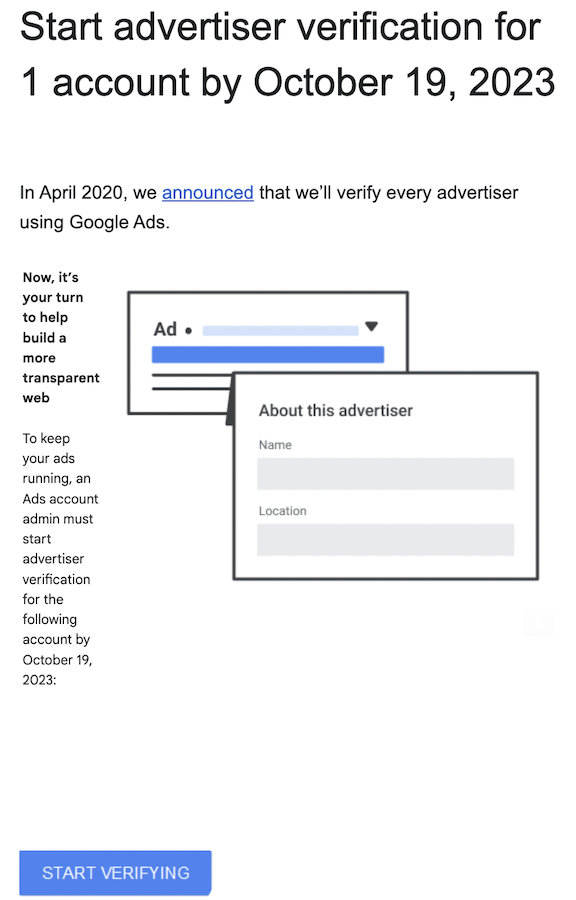
Once you receive the e-mail, you’ll be given 30 days to initiate the verification process. Should you fail to do so, your account will result in suspension. You can easily check your verification status and complete the process in your Google Ads account under “Tools & Settings” – “Billing – “Advertiser verification”. You can also access the verification form via e-mail or in-account notification from Google.
This is what the notification email looks like:
What to do when Google suspends the account due to incomplete verification?
Notice your ads are not running? It might be simply due to your incomplete verification.
Some advertisers’ accounts were suspended immediately after the program was initiated. Google suspends accounts based on information obtained from a variety of sources, such as regulatory warnings, rulings, or complaints about an advertiser’s business practices, impersonation, or scams.
No worries! You can appeal your account suspension by successfully completing the verification process. Unfortunately, if you do not fulfill the verification criteria, your account will remain paused.
Latest updates
Beginning in October 2023, Google will require selected advertisers who have had their accounts suspended due to violations of Google Ads policy to undergo Advertiser verification to appeal their account suspension. Those on monthly invoicing may directly do so, without the completion of Advertiser verification
The verification process may require advertisers to provide the following information:
- D-U-N-S number if the advertiser is an organization
- US Social Security Number or phone number if the advertiser is an individual
You’ll find the official advertiser verification resources from Google here:
Learn how to complete advertiser verification
View the advertiser verification FAQ
Completing the verification on time not only protects your account from suspension but also helps build trust with your audience by demonstrating transparency. If you’re not up to navigating the Advertiser verification process by yourself, feel free to Contact us!
FAQ
Can An Agency Complete Verification On Behalf Of A Client??
Yes, agencies can assist their clients with verification, but the process must be completed using the advertiser’s actual business details and legal documents.
Will I Need To Complete Advertiser Verification Again In The Future?
Google may periodically request advertisers to reverify their identity and business operations to ensure continued compliance with their policies.
Where Can I Check My Verification Status?
You can track your verification status in Google Ads → Billing → Advertiser verification or via the email notifications sent by Google.
Back to previous pageAsk our free AI chatbot.
Blog
Useful Nonprofit Marketing Tips & Tricks



- Ad Grants
- News
A Nonprofit’s Guide To Measuring AI Visibility
Know where your organisation appears.
Read more
- Ad Grants
- News
The Ultimate Guide To Google Ad Grants 2026
Navigate Google Ad Grants with confidence.
Read more


Contact us directly or schedule a slot to talk to our expert team!
- AboveX Digital LLC
- 4023 Kennett Pike #50116, Wilmington, DE 19807 USA
- +1 (619) 330-9997
- Mon – Fri 9:00 am – 5:00 pm EST
- info@abovexdigital.com