
A Second Admin Must Now Approve
The extra step that keeps your account safe.
Until recently, anyone with admin access to a Google Ads account could invite a new user, remove an existing one or change someone’s role with a few clicks. That convenience had a downside. If a single admin login fell into the wrong hands, an intruder could quietly add themselves to the account and lock everyone else out.
To close that gap, Google introduced multi-party approval in the summer of 2026. Changes to who can access an account now need a second pair of eyes, another administrator has to confirm them before they take effect. In the week of December 7, 2026, Google is adjusting how these approvals work behind the scenes for the tools and agencies that manage account access on their clients’ behalf.
The update itself is technical, but the approval step is something every nonprofit with a Google Ads or Ad Grants account will run into sooner or later. Here is what it means for you, explained without the jargon.
What Changes For Your Ad Grants Account
In day-to-day work, multi-party approval shows up whenever someone’s access to the account changes. According to Google’s help page on multi-party approval, a second administrator now has to approve when:
- a new user is invited to the account,
- an existing user is removed,
- a user’s role is changed, for example from read-only to admin.
The request appears in your account under Admin > Access and security, in the Multi-party approvals tab, where any other admin can approve or deny it. A few details are worth knowing:
- Requests expire after 20 days – If nobody responds in time, the change simply doesn’t happen and has to be requested again.
- Google Support can’t step in – It cannot approve, deny or bypass a request for you, so the decision always stays with your own team.
- Read-only users are exempt – Granting someone view-only access doesn’t trigger the extra step.
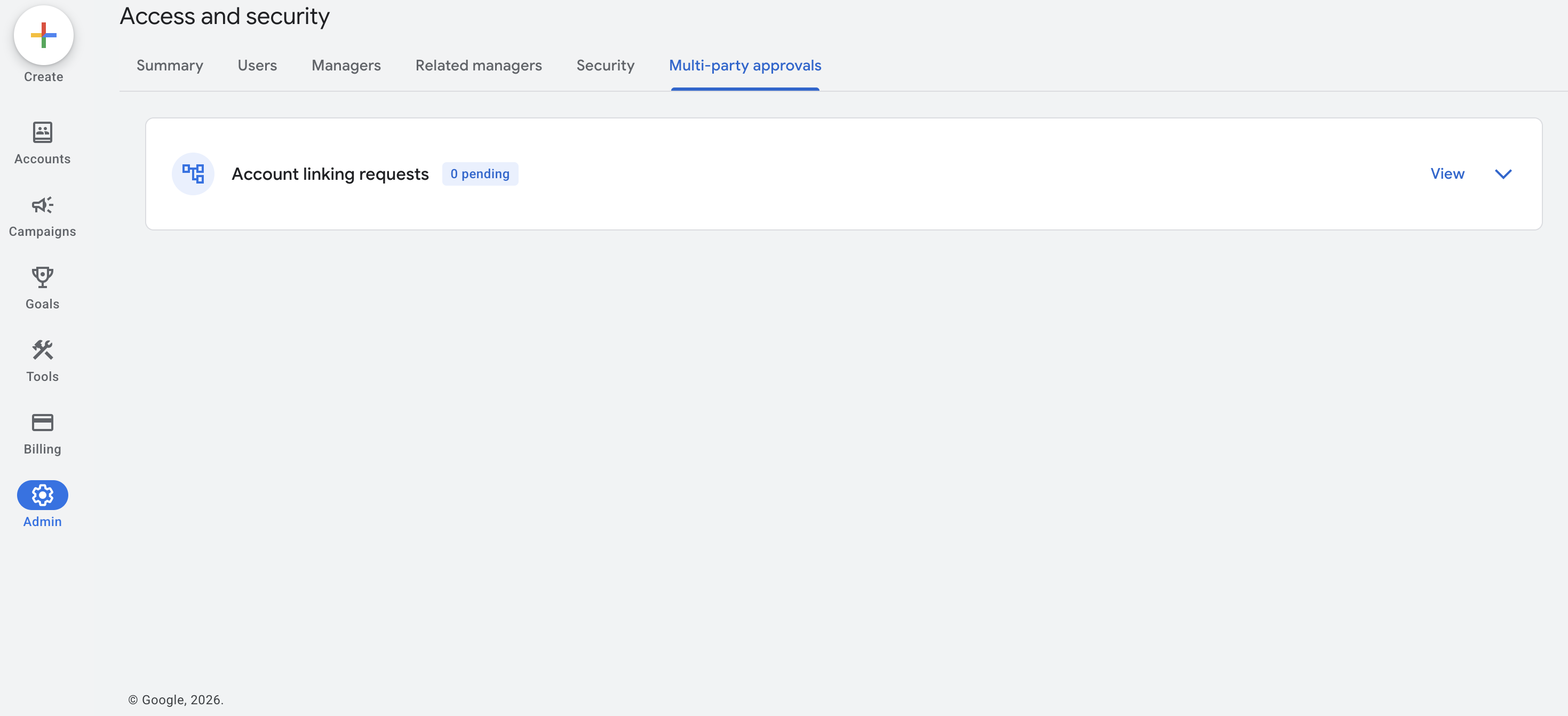
The December update builds on this. When an agency or a tool invites a user to your account automatically, the invitation will only be created once another admin has approved it. Until then, it simply waits. For you, nothing changes in how you approve requests, but it explains why a new user may not appear in the account straight away.
How To Stay Ahead Of It
Multi-party approval asks very little of your team, but it does reward a bit of preparation:
- Know who your admins are – Review the list of users with admin access and make sure at least two of them are people who still work with your organization and can respond quickly.
- Keep an eye on security requests – Google sends notifications when a request is waiting, but they are easy to miss in a busy inbox. A quick look at the Multi-party approvals tab every now and then saves a lot of back-and-forth.
- Act within the 20 days – An expired request means starting over, which can delay a new colleague’s onboarding or the start of a new agency partnership.
- Clean up old access – Former staff, volunteers and past agencies should not keep admin rights. Removing them now requires an approval too, so it is worth doing before the list grows any longer.
How We Handle It For Our Clients
When a nonprofit starts working with us, adding AboveX Digital to the account is one of the very first steps, and it now goes through this approval process. We let you know as soon as a request is waiting, explain exactly where to find it and confirm once everything is in place. The same applies whenever access needs to change later on, so no request quietly expires in the background.
Conclusion
Multi-party approval adds one more click to a handful of account changes, and in return it makes your account considerably harder to take over. The December update doesn’t change what you need to do, but it is a good reminder to check who has access to your account and who is ready to approve requests when they arrive.
Have questions about access to your Ad Grants account? Contact us today!
FAQ
What Is Multi-Party Approval In Google Ads?
It is a security feature that requires a second administrator to confirm sensitive changes in a Google Ads account, such as changes to who has access. Its purpose is to block hijacking attempts and unauthorized actions.
Which Changes Need A Second Admin’s Approval?
Adding a new user, removing an existing user and changing a user’s role. Linking an account to a manager account also requires approval, and Google notes that other actions may follow.
Where Do I Approve A Request?
In your Google Ads account, go to Admin > Access and security and open the Multi-party approvals tab. Any other user with admin access can approve or deny the request there.
What Happens If Nobody Approves The Request?
The request expires after 20 days and the change doesn’t take effect. It then has to be requested again.
Can Google Support Approve A Request For Us?
No. Google Support cannot approve, deny or bypass a multi-party approval request, so the decision always stays with your organization’s admins.
Do We Need To Do Anything Before December 7?
No action is required on your side. The December update concerns the tools and agencies that manage account access. It is, however, a good moment to check who has admin access to your account and make sure someone is ready to approve requests when they arrive.
Back to previous pageAsk our free AI chatbot.
Blog
Useful Nonprofit Marketing Tips & Tricks



- Ad Grants
- News
- Tips
AI Overviews Are Raising The Bar For Ad Grants
What it means for your Ad Grants...
Read more
- Ad Grants
- Tips
How To Manage Your Google Ad Grants Account?
Six habits of a well-run grant account.
Read more



- Ad Grants
- News
A Nonprofit’s Guide To Measuring AI Visibility
Know where your organisation appears.
Read moreContact us directly or schedule a slot to talk to our expert team!
- AboveX Digital LLC
- 4023 Kennett Pike #50116, Wilmington, DE 19807 USA
- +1 (619) 330-9997
- Mon – Fri 9:00 am – 5:00 pm EST
- info@abovexdigital.com