
A Nonprofit’s Guide To Measuring AI Visibility
Know where your organisation appears.
Over the past few months, one question keeps coming up on client calls: when someone asks ChatGPT or Gemini about our cause, do we show up? Three more usually follow. How does the AI decide who to mention in the first place? Is there anywhere we can go and check whether it mentions us? And does any of it actually bring in donors, volunteers, or the people we’re trying to reach?
They’re fair questions, and until recently there was very little hard data to answer them with. That has changed over the past year. There are now real answers to each one, along with a fair amount of noise and a few things being sold that don’t work. This article separates the two: what you can measure today and what you can’t, what genuinely improves your chances of being mentioned, which tools give you the data, and more.
What AI Visibility Actually Means
AI visibility is the extent to which your organisation appears when people use generative AI to research the questions, problems and topics relevant to your work. That can mean being explicitly mentioned in an answer, being recommended alongside other organisations, or having your website used as a source.
It is different from traditional search visibility because there is no single ranking position to monitor. The same question can produce a different answer depending on the model, the wording of the prompt, the time of the search and the sources the system retrieves.
For an organisation, AI visibility can therefore include:
- Brand mentions – whether your organisation appears in the answer at all.
- Recommendations – whether the AI actively presents you as an organisation worth considering.
- Citations – whether your website or other sources about you are used to support the answer.
- Position and prominence – whether you appear as the first recommendation or somewhere much further down.
- Sentiment and accuracy – how the AI describes your organisation and whether that description is correct.
- Competitive visibility – how often you appear compared with other organisations addressing the same problem.
The important distinction is that being cited is not necessarily the same as being recommended, and being visible does not necessarily mean generating a website visit. AI answers are often designed to resolve the user’s question without requiring a click.
How To Measure It
There is no single number that tells you how visible your organisation is inside AI tools, and anyone selling you one is flattening something that isn’t flat. What exists instead is a set of partial signals. Combined, they give you a fair picture.
Why The Old Approach Doesn’t Transfer
Rank tracking worked because results were stable. You looked up a keyword, saw where you sat, and the answer would still be roughly true tomorrow. AI answers don’t work that way. Ask the same question twice and you can get two different answers citing two different sets of sources, and research into this has consistently found that identical responses are the exception rather than the rule.
This isn’t a fault in the systems, it’s how they are built. But it does mean that checking whether you appeared in one answer tells you about one moment rather than about your standing.
The models also read differently. Instead of matching a phrase to a page, they work topically and go deeper into a site, pulling the specific passage that answers the specific question. A page that ranks nowhere in particular can still get cited if it answers one narrow question well.
Self-Reported Attribution
There is another problem with measuring AI visibility. Sometimes the AI influences someone without ever sending them to your website. Someone might ask ChatGPT for recommendations, discover your organisation there, and later search for your name on Google or type your URL directly into their browser. GA4 may record that final visit as organic search or direct traffic, even though an AI interaction was what started the journey.
This is where self-reported attribution becomes useful. Add a simple question to a donation, volunteer, or contact form such as “How did you hear about us?” and include AI assistants as one of the possible answers. You can also leave the field open-ended so people can describe the journey in their own words. It is not a perfect measurement method. People do not always remember every touchpoint that influenced their decision. But it captures something your analytics platform cannot: what the person themselves says influenced them.
For organisations that generate leads or registrations, this information can then be connected to the CRM and followed through to donations, volunteers, applications or other outcomes. That makes it much more useful than simply counting AI clicks.
Prompts & How To Track The Right Ones
The prompts you choose are probably the most important decision in the entire measurement process. If you track the wrong questions, every metric that follows can look precise while telling you very little about whether you’re visible for the things that actually matter.
This is an easy trap with dedicated AI visibility platforms. Tools such as Profound, Peec and AirOps can automatically recommend prompts to track, but those recommendations are not necessarily based on what your audience is actually asking. As David Khim of Search Engine Journal notes, these systems appear to derive suggested prompts largely by analysing your existing website and mapping the pages and topics they find there to questions an AI system might answer. In other words, they can start from what you already publish and work backwards to potential prompts.
That can be useful for building an initial list, but it creates a blind spot. If your website doesn’t yet cover an important question, the tool has little reason to suggest that question in the first place. You can end up measuring the prompts your existing content is already suited to, rather than the questions where you actually want to become visible.
Your organisation already has better sources of information. Look at conversations with donors, volunteers, supporters and people using your services. Review enquiries, call transcripts, onboarding conversations, surveys and audience research. These sources tell you what people actually want to know, what objections they have and, importantly, the language they use to describe their problems. Those questions should form the foundation of your prompt set.
Once you have the list, run those prompts across the AI platforms that matter to your audience, such as ChatGPT, Gemini, Google AI Mode, Google AI Overviews, Perplexity, Claude and Copilot. Track each platform separately rather than combining everything into one number.
This matters because the systems do not all retrieve and present information in exactly the same way. A change in your visibility on one platform may not mean anything has changed elsewhere. Looking at the models individually helps you distinguish a platform-specific change from a broader shift in your visibility.
Finally, don’t treat your prompt set as permanent. Your audience’s questions change, your content changes and the AI search landscape changes. Review the prompts periodically against what your audience is actually asking, ideally at least every few months, and remove questions that no longer matter while adding new ones that do.
Google Search Console Finally Gives Us Direct AI Visibility Data
In June 2026, Google introduced Search Generative AI performance reports in Search Console, with dedicated reporting for generative AI features in Search and Discover. The Search report covers appearances in features such as AI Overviews and AI Mode. Google is currently rolling the reports out gradually rather than making them available to every site immediately.
For sites that have access, the report shows:
- Impressions – how often URLs from your site appeared in generative AI features.
- Pages – which URLs were shown.
- Countries – where those appearances happened.
- Devices – which devices were used for Search appearances.
- Dates – performance over time, with hourly, daily, weekly and monthly views.
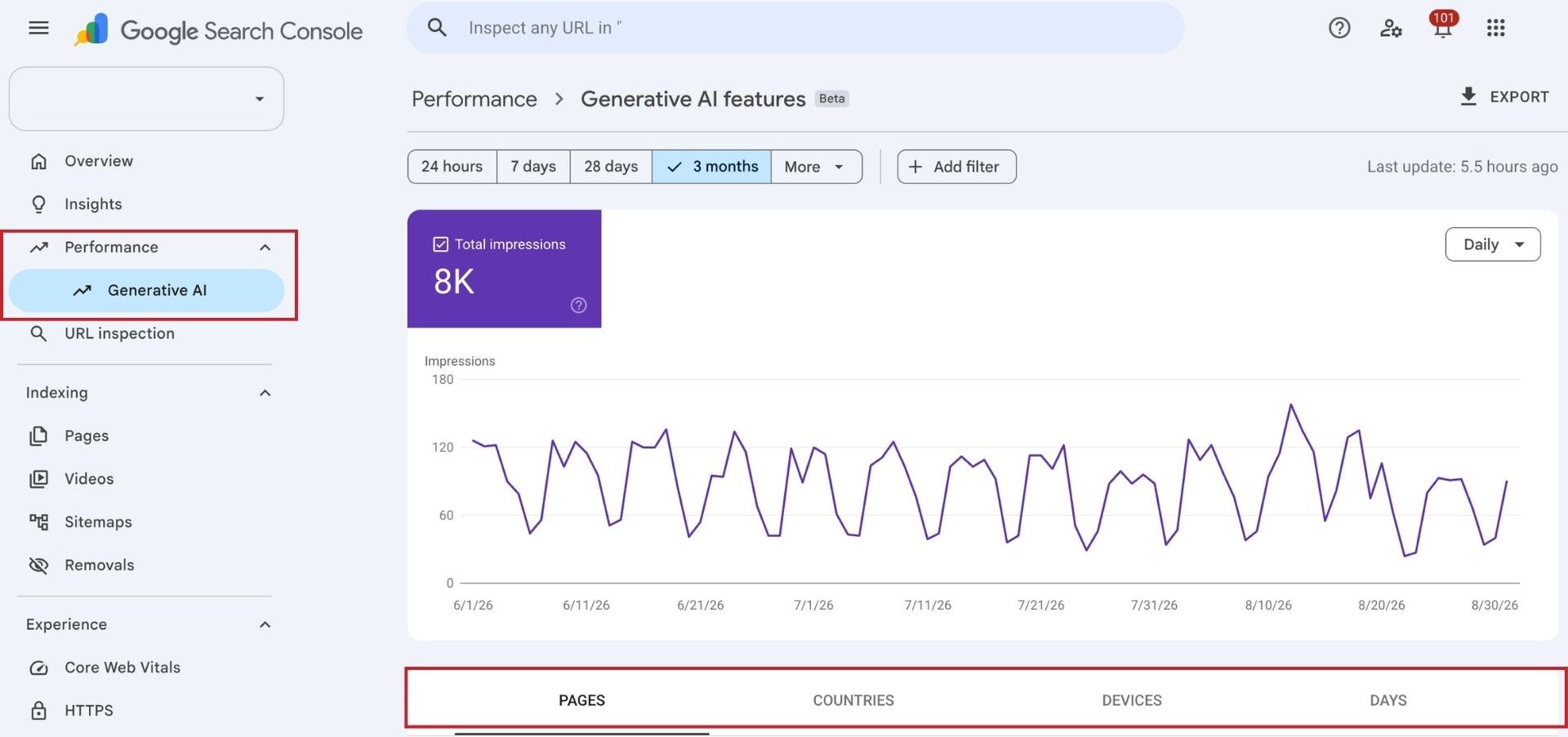
This makes Search Console one of the most useful places to monitor Google’s own AI search products. Instead of repeatedly asking AI Overviews whether your organisation appears, you can see which of your pages Google is actually surfacing inside its generative experiences.
It also adds an important dimension to the prompt tracking above. AI visibility tool can tell you whether your organisation appears in a particular answer. Search Console can tell you whether Google is actually exposing your website in its own AI search experiences at scale.
Before drawing conclusions from an empty report, check one setting. Search Console has a Search generative AI control under Settings, which governs whether your site is allowed to appear in AI Overviews, AI Mode and generative features in Discover. It is set to include by default, but if it has been switched to exclude, your content is withheld from those features and the report will show nothing while your ordinary search rankings continue unaffected, which makes the change easy to miss.
What GA4 Reveals About The Traffic From AI Assistants
Search Console helps you measure visibility inside Google’s AI experiences. GA4 answers a different question: are people actually reaching your website from AI assistants?
Until recently this took manual work. Visits from ChatGPT and similar tools arrived in GA4 as ordinary referrals, mixed in with every other site linking to you, and the only way to separate them was to build your own rule. In May 2026 Google made it automatic by adding AI Assistant as a default channel group. No configuration is required, and if you have not looked at your acquisition reports recently, this traffic may already be broken out for you.
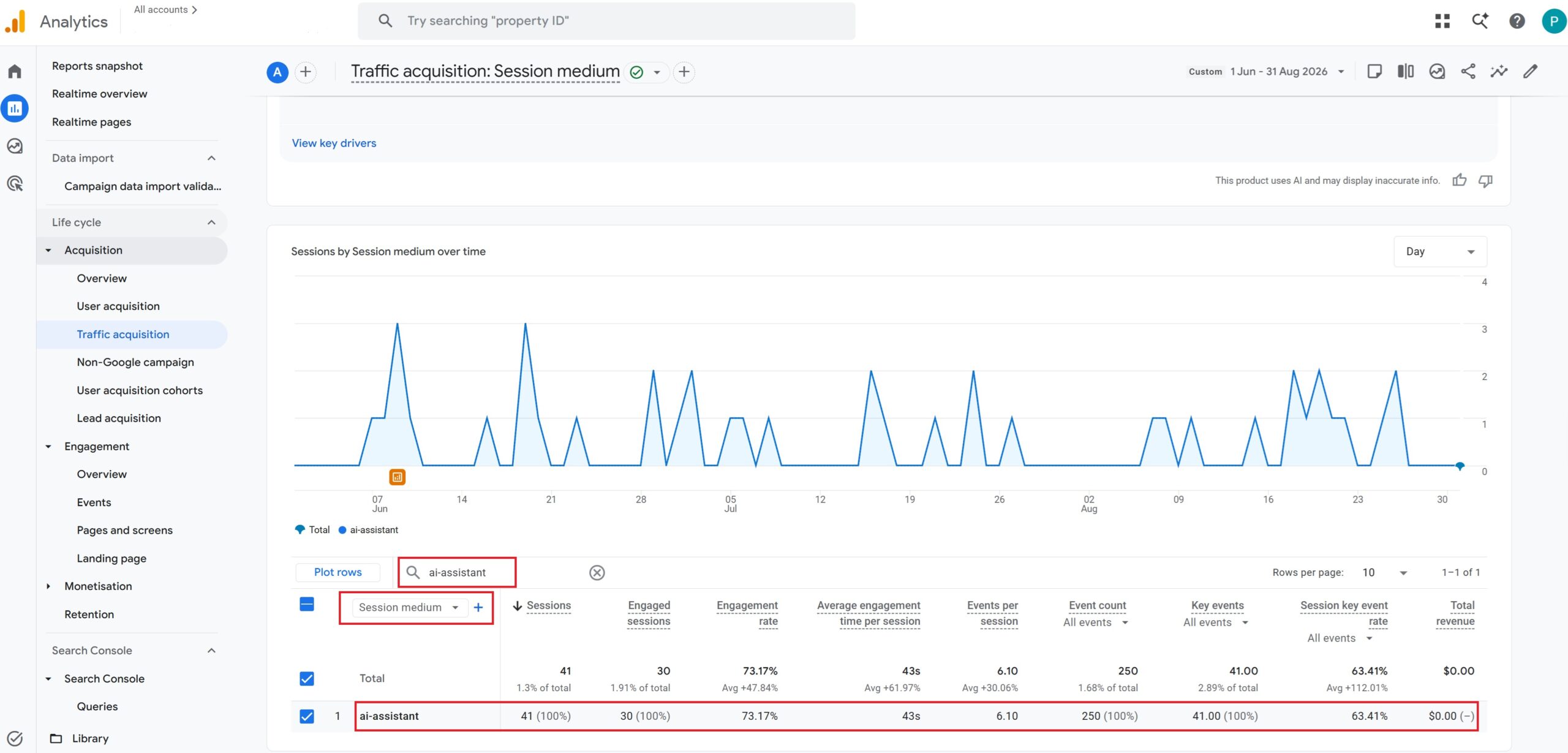
When GA4 recognises a referrer as an AI assistant, three things happen at once:
- the channel becomes AI Assistant
- the medium is set to ai-assistant,
- the campaign is labelled (ai-assistant).
That last detail is useful in practice, because it means you can filter or segment on the medium anywhere in GA4, not only in the channel report.
For nonprofits, the useful part is not the total number of AI visits. Look at which landing pages receive them, which platforms send the traffic, how those visitors engage with the site, and whether the visits lead to donations, volunteer registrations or other key events. This is the first point where AI visibility connects to measurable action on your website.
What this channel will not show you
Two gaps are worth understanding before you present these numbers to anyone.
Visits without a referrer still land in Direct
GA4 can only classify what it can see, and a great deal of AI traffic arrives with no referrer at all. Links opened in an app’s built-in browser, links followed inside a mobile app, and links people copy and paste. None of that reaches the AI Assistant channel. The same applies to someone who reads about you in ChatGPT and later returns by searching your name or typing your address, which GA4 records as organic or direct.
Google’s own AI features are excluded by design
Google’s documentation states that the AI Assistant channel does not include AI Overviews or AI Mode. This is mechanical rather than an oversight. Someone reading an AI Overview is still on Google, so a click through to your site arrives with a Google referrer and is correctly counted as organic search.
Conclusion
AI visibility is still developing, and there is no single metric that captures the full picture. But that doesn’t mean it is impossible to measure. You can track whether your organisation appears in the answers that matter, see which pages Google surfaces in its generative search features, monitor traffic from AI assistants in GA4, and ask people directly whether an AI tool influenced their decision to donate, volunteer or get in touch. Each method captures a different part of the journey. You don’t need to predict exactly how AI search will evolve. You need a reliable way to see where you stand today and enough evidence to know whether your efforts are moving the needle.
If you need help navigating AI visibility, our team is here to help. Contact us!
Back to previous pageAsk our free AI chatbot.
Blog
Useful Nonprofit Marketing Tips & Tricks


- Ad Grants
- News
The Ultimate Guide To Google Ad Grants 2026
Navigate Google Ad Grants with confidence.
Read more



Contact us directly or schedule a slot to talk to our expert team!
- AboveX Digital LLC
- 4023 Kennett Pike #50116, Wilmington, DE 19807 USA
- +1 (619) 330-9997
- Mon – Fri 9:00 am – 5:00 pm EST
- info@abovexdigital.com