
New Ad Grants Application Process
Changes introduced in May 2020.
The Google Ad Grants application process changed a few times in the last couple of years. The last major change occurred in late May 2020. The goal of this change was fairly straight-forward – make it easier and quicker for nonprofit organizations to activate Ad Grants. Is it so? What has changed?
Old Ad Grants Application process
As a recap, these were the application steps before May 2020:
- Check the eligibility of your organization.
- Register your organization with TechSoup.
- Create a Google for Nonprofits account.
- Submit the program survey and training.
- Create a new blank Google Ads account.
- Submit the account and survey for Phase 1 review via your Google For Nonprofits account.
- Properly set up the new Google Ads account (I will explain the optimal account set up later in this article).
- Submit your Google Ads account for Phase 2 review via your Google For Nonprofits account.
If the Google Ads account was set up correctly, the application was approved and the organization received a confirmation email. It also received an email with an invitation to a payments profile, which looks like this:
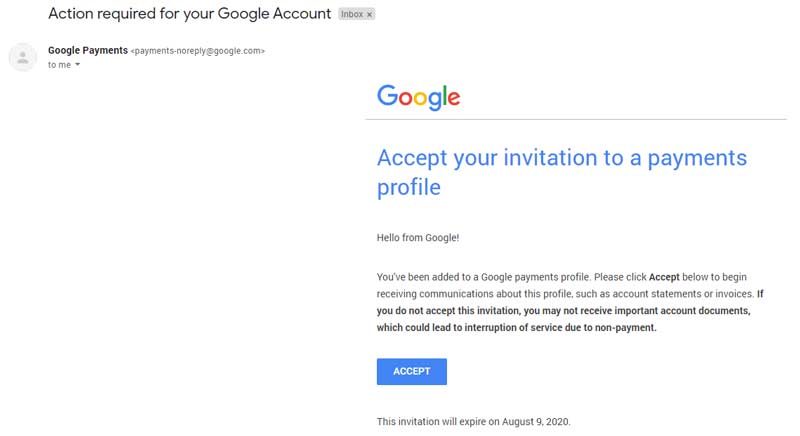
After the organization accepted this invitation as well as Google Ads terms (the terms message usually appears as a popup in the Google Ads account after the first visit), it could start using the grant budget.
This is what organizations accepted in Ad Grants program see in the billing section of their Ad Grants profile:
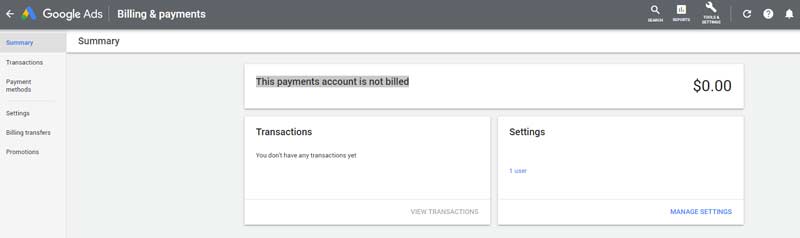
We’ve talked to hundreds of different organizations in 2019 and figured out that a large percentage of them experienced serious problems during the application process. Some of them were so frustrated with multiple disapprovals, that they decided to give up. The 1 problem they kept referencing was a complicated 2-phase application process and cumbersome setup of the new Google Ads account. We understand why.
Ad Grants program requires a specific setup for all new Google Ads accounts. Because the interface of grant accounts is shared with the interface of commercial Google Ads accounts and, at the same time, not all of its functions can be used in grant accounts, it might be confusing to get the setup right. These were the most important requirements:
- Do not enter any billing info
- Always set the account currency to USD
- Create at least 1 campaign, 2 adgroups and 2 text ads in each adgroup
- Set up only search campaigns (no display, no video)
- Opt-out of search partner targeting in campaign settings
- Set up at least 1 conversion action
These requirements were often difficult to meet, especially for organizations new to Google Ads. That resulted in a large number of disapprovals and growing frustration.
New Ad Grants Application process
The long-expected change came in May 2020, when The Google Ad Grants team introduced a new activation process. Here is how they explain the new process:
- Has clear requirements that are easy to understand – Steps to activate are short, and emphasize website quality and function, which is critical to be successful with search advertising
- Is fast and requires minimal up-front time investment – The first time a user opens their Google Ads/Ad Grant account, it is set up and they can get started
- Can be completed efficiently regardless of skill/savviness levels – Anyone with knowledge of their nonprofit can get an account and get activated
Full details of the new process can be found in Ad Grants Activation Guide.
Here are the new application steps:
- Check the eligibility of your organization.
- Create a Google for Nonprofits account.
- Sign in with your corporate email address.
- After entering your email address, you’ll see a window titled “Before getting started…”. Click “Next” to confirm that your organization does not fall under any of the listed categories.
- Complete a short survey. Ensure you have the following information: your organization’s EIN, physical address, contact details, mission statement, and website URL.
- Goodstack, Google’s new verification partner, will verify your organization. Learn more about Google’s new verification partner.
- The process of verification may take about 2-14 business days.
- Upon receiving the confirmation of your organization’s verification, you’ll be able to activate the products.
- Visit the Ad Grants product page in the Google for Nonprofits account.
- Submit your website’s URL, watch a welcome video, and finally submit an activation request.
That is it. As I’m sure you’ve rightly noticed, nonprofits no longer need to create a Google Ads account for activation. Instead, Ad Grants Support Team will create an account, activate it, and invite admins of the Google for Nonprofits account to access the Google Ads account. Apart from the invitation to access the Google Ad Grants account, the organization still receives an email with an invitation to a payments profile. It needs to be accepted along with the Google Ads terms and conditions.
Conclusion
We welcome the recent change in the application process. With no doubt, it is now simpler and more user-friendly, even for organizations new to Google Ads. The account setup isn’t part of the application process anymore, which speeds it up and eliminates a space for mistakes. The average review time is currently at approximately 3 business days.
It is important to understand that Ad Grants campaigns still need to be set up by the organization and they need to follow all compliance requirements. The setup isn’t checked by the Ad Grants team during the application anymore but it is automatically checked on an ongoing basis. Compliance problems might lead to account deactivation and every organization should pay close attention to their compliance status.
AboveX Digital helps organizations get smoothly through the entire application process, campaign setup, and efficient management. Let us know if you have any questions or if you need help with your account!
Back to previous pageAsk our free AI chatbot.
Blog
Useful Ad Grants Tips & Tricks


- Ad Grants
- News
- Services
Google Ad Grants Website Policy
Why your application got rejected, yet again.
Read more

- Ad Grants
- News
- Services
Ask Our Chatbot Anything About Ad Grants
Introducing our Ad Grants Knowledge Base chatbot.
Read more

- Ad Grants
- News
- Services
- Tips
Microsoft Ads for Social Impact Discontinued
What’s next for nonprofits?
Read more
- Ad Grants
- News
- Services
- Tips
Exclusive Google Ads Promotional Offers
Invest 500$, receive 500$ in ad credits!
Read moreContact us directly or schedule a slot to talk to our expert team!
- AboveX Digital LLC
- 4023 Kennett Pike #50116, Wilmington, DE 19807 USA
- +1 (619) 330-9997
- Mon – Fri 9:00 am – 5:00 pm EST
- info@abovexdigital.com