
10 Common Google Ad Grants Myths
Google Ad Grants myths debunked.
Many nonprofits apply for the Google Ad Grants program expecting instant traffic, effortless results, and a guaranteed $10,000 in free advertising every month. Then reality hits: campaigns underperform, accounts get suspended, or the grant barely spends at all. The truth is that Google Ad Grants can be incredibly valuable, but only when organizations understand how the program actually works. Over the years, many misconceptions have circulated around the program, leading nonprofits to make costly mistakes or unrealistic assumptions. In this article, we’ll break down 10 of the most common Google Ad Grants myths and explain what nonprofits really need to know to succeed.
Myth #1: Google Ad Grants Accounts Perform Exactly Like Commercial Google Ads Accounts
At first glance, a Google Ad Grants account looks almost identical to a standard paid Google Ads account. The interface is nearly the same, the campaign setup process is familiar, and many of the same features are available. However, these two tools operate very differently behind the scenes.
Google Ad Grants accounts come with a unique set of restrictions and policies that commercial advertisers do not face. For example:
- Grant accounts can only run text-based search ads (Display, video, shopping, and remarketing ads are not allowed)
- Accounts must follow specific compliance requirements including specific requirements for account structure, valid conversion tracking, keep a 5% CTR, etc.
- Grant ads participate in a separate auction from paid advertisers and are inferior to paid ads
This means strategies that work well for commercial advertisers often do not translate directly into Ad Grants accounts. Nonprofits that treat Ad Grants like a regular paid account often become frustrated by low impressions and a limited spend. Success with Ad Grants requires a specialized strategy designed to work around the program limitations.
Myth #2: The $10,000 Monthly Grant Is Guaranteed Spend
One of the biggest misconceptions is that nonprofits automatically receive $10,000 worth of traffic every month. In reality, Google provides up to $10,000 per month in advertising credit, not guaranteed ad spend. Many organizations spend only a fraction of the available budget. According to Google statistics, the global average spend runs around $500 per month. Why does this happen?
Most nonprofits initially manage the grant very cautiously. They:
- Use overly restrictive budgets
- Use a handful of highly relevant and competitive keywords in exact match
- Use conservative bidding
- Do not max out their daily budgets
- Create a poor account structure with 1-2 campaigns, etc.
As a result, the account simply does not have the right foundation to scale and spend the full grant amount. Organizations that continuously optimize campaigns, expand keyword their coverage, and implement functioning conversion tracking can significantly increase their monthly spend over time. The key is understanding that with the grant, you sort of need to think outside the box and expand as much as possible.
Myth #3: There Is A Strict $2 Bid Cap On Keywords
The $2 bid cap only applies when using manual CPC bidding. Nowadays, Google Ad Grants accounts are expected to use Smart Bidding strategies, which removes the outdated bid limit. In fact, Smart Bidding is strongly recommended, as relying on manual bidding can negatively impact performance and may even put your account’s compliance at risk. Our most commonly used are:
- Maximize Conversions with a Target CPA
- For accounts with a long performance history and significant conversion data, we may even use the Maximize Conversion Value bidding strategy.
When Smart Bidding is enabled, Google can automatically bid far above $2 if the system predicts a strong chance of conversion. This is especially important for competitive nonprofit keywords where higher bids may be necessary to appear in search results.
Myth #4: You Cannot Accidentally Spend Real Money
This misconception can become very expensive. While Google Ad Grants itself is free, nonprofits can incur real charges if the account is configured incorrectly. The most common issues include:
- Adding billing information during setup
- Accidentally creating campaigns in a commercial account instead of the Grant account – add automated billing, broad targeting, and a billing email not belonging to the account manager, and you get a very deadly cocktail.
Here are the most common scenarios leading to this mistake:
- A new account manager without prior Ad Grants experience logs in with an email address not associated with an Ad Grants account, follows the setup guide, and uses the account as if it was an Ad Grants account.
- An organization has multiple Google Ads accounts and new campaigns are mistakenly created in a commercial account.
These mistakes can generate unexpected bills, sometimes costing organizations thousands of dollars. Unfortunately, Google does not always issue refunds for these errors. That’s why nonprofits should carefully separate their Grant account from any commercial Google Ads account.
Myth #5: You Can Use Video Ads, Banner Ads, or Other Formats
Google Ad Grants supports only text ads serving in Google search results and Performance Max campaigns serving in search and Google Maps. That means the following formats are not included:
- YouTube video ads
- Display ads
- Shopping ads
- App ads
- Demand Gen/Discovery ads
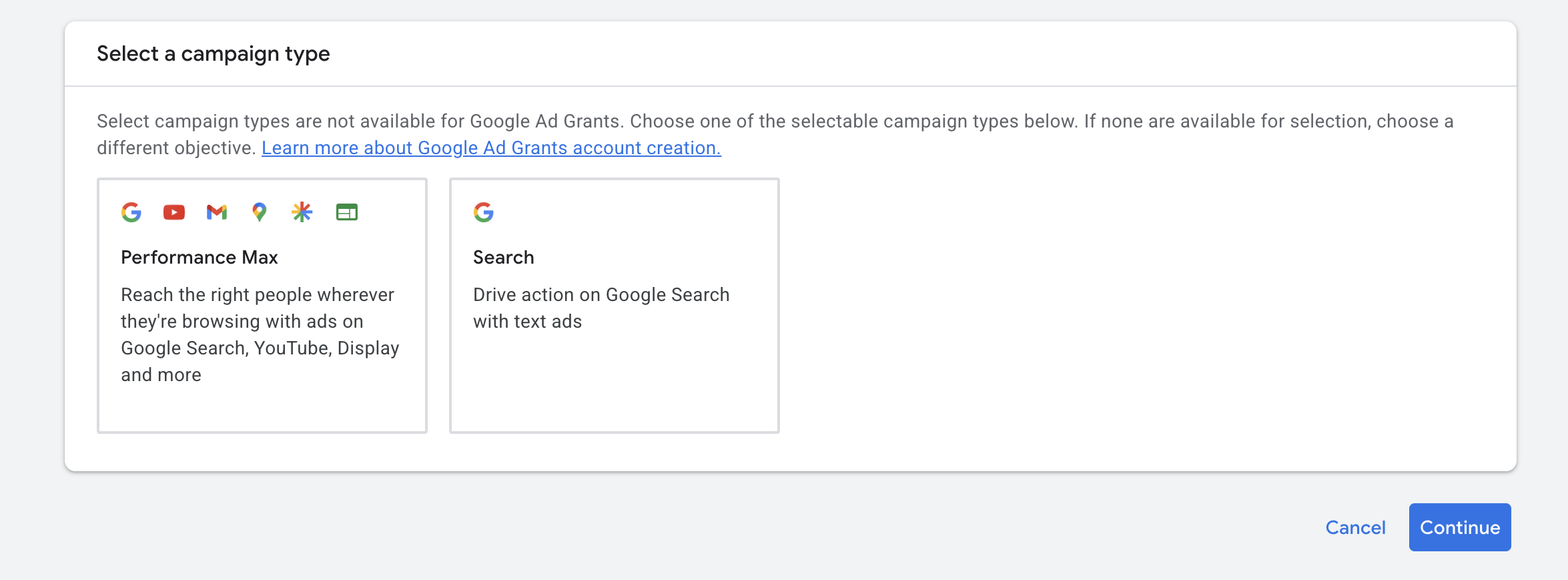
Many nonprofits discover this limitation only after joining the program and planning visual campaigns that the grant cannot support. If your organization wants to run video campaigns or visual awareness advertising, you’ll need a separate paid Google Ads account for that.
There are, however, several ways to make your search ads stand out more in crowded search results. One of the most effective strategies is using ad assets (previously called ad extensions), which enhance your ads with additional information and increase their visibility.
Think of ad assets as the finishing touches that make your ads more engaging and useful to potential visitors. Some of the options include:
- Sitelinks that direct users to specific pages on your website
- Callout assets that highlight key benefits or services
- Call assets that make it easy for users to contact your organization
- Image assets that add visual appeal to your search ads
- and other
When used strategically, these additions can improve both click-through rates and overall campaign performance.
Myth #6: High Campaign Budgets Will Trigger Charges
Are you still under the misconception that you must divide the daily $329 limit evenly across all your campaigns to avoid accidental charges? We need you to forget this, this instant! You can safely assign much higher budgets at the campaign level.

For example:
- Campaign A: $329/day
- Campaign B: $329/day
- Campaign C: $329/day
Google will never exceed the account-wide daily grant limit. Instead, the system simply prioritizes whichever campaigns perform best on that day until the total daily allowance is exhausted. In fact, assigning higher campaign budgets is often a recommended strategy to channel the grant into your best-performing ads.
Myth #7: Grant Ads Compete Equally With Paid Ads
This is one of the most misunderstood parts of the program. Paid ads are always prioritized by Google’s algorithm because they are paid for with real currency. Google Ad Grants ads are generally eligible to occupy slots that remain unsold to commercial advertisers, which often pushes them to lower positions, or sometimes you get no slot at all, especially when you aim for those highly competitive and lucrative keywords. These are, unfortunately, occupied by commercial advertisers.
However, this does not mean success is impossible.
Well-optimized Ad Grants accounts can still generate substantial traffic and conversions, especially when:
- Campaigns are well-structured
- Landing pages are keyword-optimized and content-rich
- Conversion tracking is configured correctly
- Smart bidding is used effectively
- Long-tail keyword strategies are implemented
Experienced Ad Grants professionals understand how to maximize the grant despite these limitations.
Myth #8: Google Ad Grants Is “Set It and Forget It”
It’s a common misconception that Google Ad Grants campaigns can be launched once and then left running indefinitely. Which is partially true, but without any intervention, that approach can easily end up in account suspension. Google Ad Grants requires ongoing account management and compliance maintenance. Organizations must:
- Log in regularly – at least once every 30 days
- Optimize campaigns consistently – make changes at least every 90 days
- Monitor keyword performance – Google now automatically pauses keywords with a quality score of 1-2, however, you still want to pay attention to keywords and negative match anything completely off and add variations of well-performing keywords
- Keep conversion tracking active – track at least 1 conversion per month
For your own sake, keep monitoring your account for ad and asset disapprovals. Should your ads get disapproved due to a Google Ad Grants policy, your ads won’t show up in search results, and thus, you’re losing your exposure.
Accounts that fail to remain active or compliant can be suspended or deactivated. Successful Ad Grants management is an ongoing process, not a one-time setup.
Myth #9: Ad Grants Deliver Immediate Results and High ROI
Organizations often expect to see strong results within days or weeks of launching their campaigns. However, modern Ad Grants campaigns rely heavily on machine learning and automated bidding systems that require sufficient data and time to optimize effectively.
Most new Ad Grants accounts experience a learning period of roughly 3-6 months before performance stabilizes. During this initial phase, the account is often stuck with limited data, which prevents algorithms from reaching their full potential.
This period is essential for:
- Accumulating Conversion Data – Ad Grants rely on Smart bidding, which is dependent on historical conversion signals to know which users are most likely to take valuable actions.
- Building Quality Scores – Google assigns a Quality Score (1–10) to every keyword based on relevance and historical click-through rate (CTR). These scores do not appear instantly but build up as the account establishes a track record.
- Algorithmic Learning – Bidding algorithms need a steady stream of data to “learn” how to win auctions efficiently. Making significant changes to bids, keywords, or ads during the first few months is discouraged because it can erase the account’s history and prolong the learning process. Stability is key.
- Unsuitability for Short-Term or Urgent Promotions – Because of the mandatory ramp-up time, Google Ad Grants is not an appropriate platform for short-term events, urgent one-time campaigns, or time-limited promotions where immediate results are a requirement. Successful organizations view the grant as a long-term strategic asset rather than a “quick fix” for visibility.
Myth #10: Google Ad Grants Is a Cash Grant
Despite the name, Google Ad Grants is not a cash donation. The program provides advertising credit only.
Nonprofits cannot:
- Withdraw the funds
- Transfer the credit
- Use it for operational expenses
- Pay agency fees with it
- Cover salaries or software costs
The grant can only be used to run campaigns in Google Search within the program’s rules. Think of it as free access to Google’s advertising platform, not unrestricted funding.
Conclusion
Google Ad Grants can become one of your most powerful assets, but only when you understand the realities of the program. If you struggle, it’s often not because the grant “doesn’t work,” but because you enter the program with unrealistic expectations or outdated information.
With the right strategy, ongoing optimization, and realistic expectations, Google Ad Grants can generate significant awareness, traffic, donations, volunteer signups, and community impact over time.
Need help with your application or ramping up your campaigns? Schedule a consultation with our team!
Back to previous pageAsk our free AI chatbot.
Blog
Useful Nonprofit Marketing Tips & Tricks




- Ad Grants
- News
A Nonprofit’s Guide To Measuring AI Visibility
Know where your organisation appears.
Read more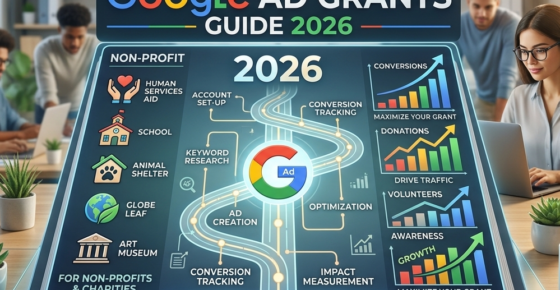
- Ad Grants
- News
The Ultimate Guide To Google Ad Grants 2026
Navigate Google Ad Grants with confidence.
Read more


Contact us directly or schedule a slot to talk to our expert team!
- AboveX Digital LLC
- 4023 Kennett Pike #50116, Wilmington, DE 19807 USA
- +1 (619) 330-9997
- Mon – Fri 9:00 am – 5:00 pm EST
- info@abovexdigital.com